Why I Use FreeCAD
And why you should, too!
In my day-job as a CNC technician and manufacturing engineer, my employer provides me with a powerful CAD workstation equipped with a SolidWorks license. When I first started looking at FreeCAD, it was mainly because I didn’t want to mix personal projects with my well-organized work laptop. IT restrictions on that company machine make it difficult to install my own software or configure the environment the way I like. Besides, because I am staring at that Windows laptop most of the day, when I get home, I want the comfort of my cozy, personalized Linux setup. FreeCAD is one of the very few CAD options available to me in that environment.
But now that I’ve been using FreeCAD at home for a few years, it might surprise you to hear that I actually prefer it over SolidWorks in many cases. In fact, thanks to it being available as a portable Windows application, I’ve even started using it at work.
This is my personal testimony to what makes FreeCAD great: why I use it, why I support the project financially, and why I think you should too!
It’s Free
Let’s start with the most obvious advantage: FreeCAD is completely free. It costs exactly 0 to use, forever.
Unlike commercial alternatives, there are no annual licensing fees, no subscription plans to maintain, and no tier lists that lock advanced features behind paywalls. You will never have to worry about a license expiring or a company changing its pricing model to squeeze more money out of your hobbies or business. You are also never arbitrarily locked out of core features; unlike Autodesk Fusion 360, which restricts basic functionalities like exporting technical drawings or using standard file formats to its paid tiers, FreeCAD leaves all of its tools unlocked and accessible from day one.
It’s Open Source
Beyond being free of cost, FreeCAD is open source, which means its code is public and community-driven. This model has fueled an incredible pace of innovation. Over the past four years, the project has made significant, visible improvements with every single release. It is constantly under development, and the momentum is only growing. Thanks to its rising popularity and a surge in developer support, the project is moving to a new development cycle that will push out three major releases per year.
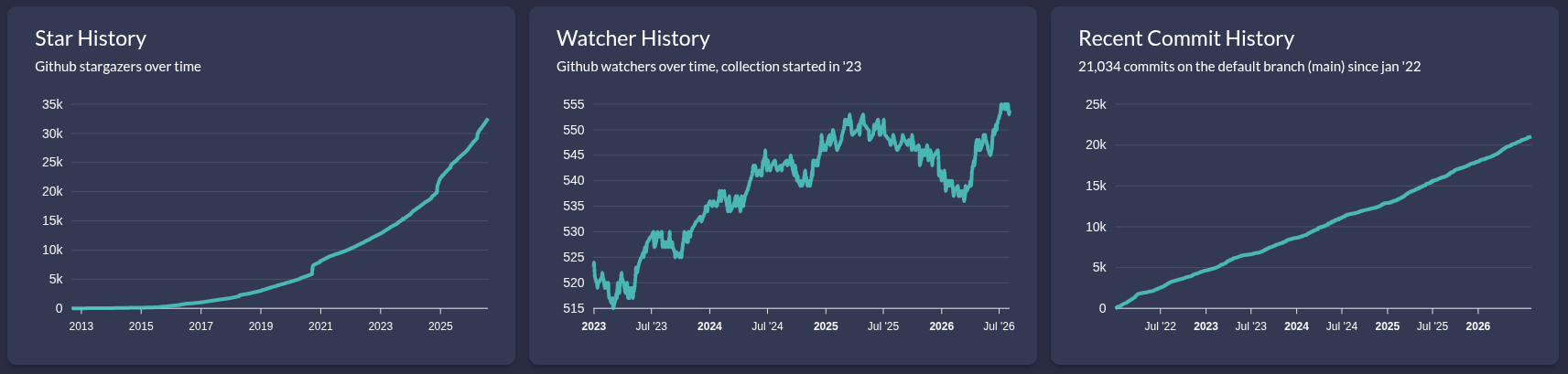 FreeCAD’s GitHub stats since 2009.
Because it is open source, developers can create forks of the project to experiment with new ideas and push CAD technology forward:
- Ondsel was a heroic attempt to build a commercial ecosystem around FreeCAD. Although the company has since shut down, they added some fantastic features during their operation—many of which are now being integrated back into the official FreeCAD project.
- AstoCAD is another fork where a small team charges a membership fee to provide specialized new features and improvements layered on top of the official release.
- realthunder’s Link Branch: Created by user and developer realthunder, this branch originally started to add support for a dedicated assembly workbench. Much of this work has since been merged into the main branch, and the “link branch” continues to serve as an unofficial preview of future FreeCAD features.
For those who want to customize their experience, FreeCAD offers extensive documentation on how the software is built on its wiki and GitHub. It also features a robust Python-based API. I am not a software developer myself, but with the help of AI, I’ve managed to write my own helpful macros to automate repetitive tasks and tailor the workflow specifically to my needs.
It’s Free AND Open Source
The combination of being both free and open source yields a level of user freedom that commercial software simply cannot match. First and foremost, it is your software, and you can use it for whatever you want.
Commercial CAD programs often come with highly restrictive licenses. If you create a design on a personal or hobbyist license and later decide to sell it, those corporations can (and do) come after you for licensing violations. If you want to sell manufactured goods based on your FreeCAD designs, or sell your services as a freelance CAD modeler, you can do so freely without looking over your shoulder.
Furthermore, your files belong to you. FreeCAD does not coerce you into storing your designs in a corporate cloud. Everything stays local, completely under your control, and saved in open formats. FreeCAD will never spy on you, claim ownership of your intellectual property, or use your designs to train AI models.
It’s Fast and Lightweight
In my professional experience, SolidWorks is a massive resource hog. It takes several minutes just to start up. Even on the capable Dell Precision 3591 workstation my employer provides, SolidWorks frequently complains that it is running out of system resources after opening just two or three simple models and drawings.
By contrast, on my older Dell Precision 3541 personal laptop, FreeCAD is loaded and ready to go in under 7 seconds. This startup time includes all of my installed plugins and holds true despite running it as a Flatpak application, which typically carries its own startup overhead. Once open, FreeCAD stays responsive. It doesn’t get bogged down even when handling large, complex projects like this model of a Prusa i3 Hephestos 3D printer.
While FreeCAD is occasionally criticized for its default UI and model aesthetics, these are easy to address. The interface can be modernized using popular custom themes, and the clean, flat style of the rendering is actually highly functional when modeling. Should you need high-fidelity visualizations, FreeCAD can tie directly into Blender (another phenomenal free and open-source tool) using the Channels Addon. This addon establishes a live link between your parametric CAD model and your Blender workspace. Once you set up your materials, lighting, and camera inside Blender, any subsequent geometry modifications made in FreeCAD will automatically propagate to the Blender project, making high-quality rendering a seamless part of your design cycle.
Easier to Learn
A few years ago, recommending FreeCAD to beginners was difficult. The learning curve was steep, and searching the wiki or forums often led to frustrating responses telling users to “read the manual.”
Today, the learning environment has completely changed. The official wiki has been extensively revised and expanded, and a vibrant community of creators has emerged. Excellent blogs and YouTube channels can get you up to speed quickly:
- MangoJelly Solutions for FreeCAD (YouTube)
- Deltahedra (YouTube)
- OffsetCAD (YouTube)
- JokoEngineeringHelp Upload frequency is very low, but there’s gold content here.
- FCB Lounge (YouTube) for BIM/architecture tutorials.
- DuyQuang Dang (YouTube) for advanced modeling techniques.
- dprojects woodworking (YouTube) is great for carpentry projects.
- Open Source CNC (YouTube) for learning the CAM workbench.
- FreeCAD Blog By MangoJelly Solutions
- Yorik’s Blog
The forums have also evolved. Far from the old stereotypes, the FreeCAD forum community is now incredibly friendly, patient, and helpful to newcomers.
Contrast this with SolidWorks: while there are plenty of tutorials online, the best educational content and official support channels are locked behind steep paywalls. With FreeCAD, high-quality help is accessible, open, and free to everyone.
More Than CAD: CAM and BIM Workflows
FreeCAD’s scope goes far beyond traditional mechanical design. It is a multi-disciplinary tool capable of modeling everything from tiny machined parts to woodworking projects and full-scale architectural structures.
For manufacturing, FreeCAD includes a built-in CAM (Path) workbench for converting 3D models directly into G-code for CNC machines. SolidWorks has no built-in CAM at all; to get that functionality, you have to buy a completely separate software package from a different company or pay for an expensive add-on.
Admittedly, FreeCAD’s CAM workbench isn’t quite ready to replace high-end factory floor solutions yet—the UI can be complex and it currently lacks turning/lathe support—but it is one of the most actively developed areas of the project. It improves significantly with every release.
For architects and builders, FreeCAD features a mature, highly-developed BIM (Building Information Modeling) workbench. It has been a core part of the software for a long time and is thoroughly documented. Visiting Yorik’s blog reveals impressive examples of what FreeCAD can accomplish in architectural design. Furthermore, the BIM workbench provides access to an extensive library of pre-modeled objects—ranging from furniture like tables and cabinets to vehicles and fixtures—allowing you to quickly populate and detail your architectural designs without having to build every component from scratch.
It’s Better With Multiple Files
Though it might be a controversial opinion, I find it much easier to manage complex, multi-component projects in FreeCAD than in SolidWorks.
Because SolidWorks is so resource-heavy, handling a dozen open documents is a chore. Its interface lacks clean document tabs or a unified multi-document tree. Users are forced to rely on the window list or cycle through files using Ctrl+Tab. The Ctrl+Tab switcher in SolidWorks is notoriously slow, frequently fails to load preview thumbnails, and cuts off filenames, making navigation a headache. FreeCAD’s clean document tab system and hierarchical tree view make jumping between files fast, predictable, and simple.
Additionally, FreeCAD’s system for linking and referencing external models is incredibly efficient and far less resource-intensive than its proprietary competitors. Because every open file is visible in a unified document tree, you can easily browse through your projects, select the exact part or body you need, and link it directly into your active workspace. If you make updates to the original external file, those changes propagate instantly to your main assembly, keeping your design in sync without consuming gigabytes of RAM.
This capability makes the assembly workbench exceptionally powerful for building and testing complex mechanisms. You can construct large, intricate machinery by organizing your designs into smaller, manageable sub-assemblies. When the time comes to document your design, FreeCAD makes it simple to generate exploded views, allowing you to clearly illustrate how parts fit together.
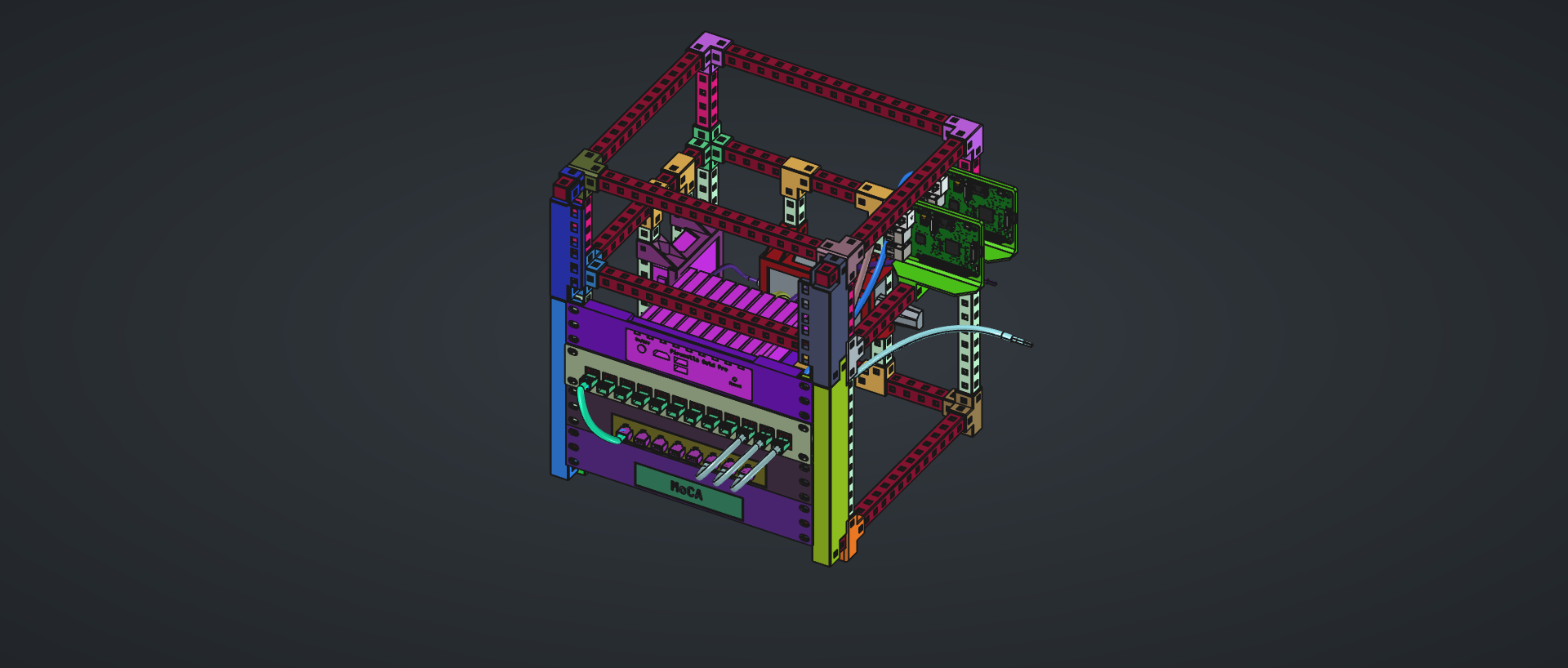 For example, I recently designed a 10-inch mini networking rig using the HomeRacker system. Before printing anything, I wanted to verify the fitment of all the components and calculate the exact quantity of printed parts needed. I modeled the entire assembly in FreeCAD using multiple sub-assemblies—down to the individual wires. Seeing everything fit together virtually saved me hours of trial-and-error in physical prototyping.
Interestingly, you don’t even strictly need a dedicated assembly workbench to build complex machines in FreeCAD. If your design has static components and you know their exact coordinates, you can position parts simply by editing their placement properties. This lightweight, bottom-up approach is precisely how the Prusa printer model mentioned earlier was constructed.
It’s Better for Makers And 3D Printers
For makers, creators, and hobbyists, FreeCAD is the logical choice. The combination of open-source code, community-built add-ons, open licenses, and complete data sovereignty aligns perfectly with maker culture.
With FreeCAD, no corporation can restrict which file formats you are allowed to export—a common frustration for AutoCAD and Fusion 360 users on free tiers. Instead, you have the native freedom to import and export using an extensive list of industry-standard file formats. If your design becomes successful and you decide to sell it on Etsy or launch a Kickstarter, you do not owe royalties to a software vendor.
For 3D printing enthusiasts, FreeCAD has an ample toolset. The Mesh workbench allows you to import and modify existing STL files shared by other makers. Helpful add-ons like the Fused Filament Design macro make it simple to incorporate 3D-printing-specific design features directly into your geometry, such as self-supporting teardrop holes, zip-tie routing channels, and clean counterbore bridges. Additionally, while 3MF export is natively supported, the 3D printer 3mf workflow macro streamlines your print prep by enabling you to update exported 3MF files while preserving your print settings. When building assemblies, you can skip modeling standard hardware entirely by pulling from a massive catalog of pre-modeled bearings, couplings, pulleys, and motors via the community-maintained Parts Library.
Finally, when sharing your creations with the community, FreeCAD promotes collaboration. Sharing a proprietary file format locks out anyone who cannot afford an expensive license. Sharing a FreeCAD file (.FCStd) or standard open formats (like STEP) ensures that anyone, anywhere in the world, can download the software for free and build upon your work.
FreeCAD isn’t just a tool; it’s an investment in a free, open, and collaborative future for design and manufacturing. If you haven’t tried it recently, now is the perfect time to download it, explore the new features, and support the community.
Conclusion
Ultimately, FreeCAD is no longer just a compromise for Linux users or budget-conscious hobbyists. It has matured into a robust, high-performance ecosystem capable of standing toe-to-toe with industry giants in many workflows. By choosing FreeCAD, you aren’t just saving money on licensing fees; you are reclaiming ownership of your data, supporting a community that values open collaboration, and investing in a tool that respects your freedom. Whether you are a professional manufacturing engineer, a weekend maker, or an aspiring designer, FreeCAD offers the freedom to build without limits.
For all of these reasons, FreeCAD has earned a permanent place in my toolkit. It is the tool I reach for by default, both at home and increasingly at work. It has proven its value to me so thoroughly that last year I began supporting the project financially with a recurring monthly donation. While I could easily spend that money on a subscription for a commercial program, I would much rather invest in a free and open-source project that democratizes access to the world of mechanical engineering. My hope is that FreeCAD will eventually do for parametric CAD modeling what Blender did for 3D mesh modeling and animation—becoming the undisputed industry standard.
If you haven’t tried FreeCAD, or if it has been a few years since you last looked at it, I encourage you to give it a second chance. The software is evolving rapidly, and the community behind it is stronger than ever. If you find it as valuable to your workflow as I have, please consider supporting the project financially. In the world of open-source development, even a small contribution goes a long way toward building the future of design.